Homecare Scheduling Software: New Schedule Updates
Homecare scheduling software is now easier to use with Verveware’s new drawer interface, multi-day scheduling, and clearer time entry.
Resources

A Simpler Way to Create and Edit Homecare Schedules
Sagar Kumar, COO and Co-Founder, Verveware
Creating and updating schedules in Verveware now comes with a cleaner, more streamlined experience. Our latest scheduling update introduces a new drawer-based interface, simpler multi-day scheduling, and clearer visibility into tasks, exceptions, and time entries.
The core scheduling functionality remains the same. The difference is an interface designed to make everyday schedule management easier for home care agencies.
Create and Edit Schedules Without Losing Context
The most noticeable change is the new drawer-based interface for creating and editing schedules.
Instead of moving away from the schedule you are working on, the drawer gives you more screen space to enter or update schedule information while keeping the surrounding context visible.
For administrators and schedulers managing caregiver schedules throughout the day, that means a cleaner workflow for making changes without unnecessarily moving between screens.
The new interface is already available whenever you create or edit a schedule. There is nothing your agency needs to enable or configure.
Single-Day and Multi-Day Scheduling in One Workflow
The updated interface also simplifies how you choose between a one-time schedule and a schedule that occurs across multiple days.
For a single-day schedule, leave the Multi Day toggle switched off. You can then create the one-time schedule as usual.
For a multi-day schedule, switch the Multi Day toggle on. Additional scheduling options will appear, allowing you to:
Set an end date for the schedule.
Select the specific days of the week—Sunday through Saturday—when the schedule should occur.
This keeps one-time and recurring scheduling within the same workflow instead of making the process feel like two separate scheduling tasks.
For example, if a caregiver is scheduled for visits every Monday, Wednesday, and Friday through a specified end date, you can select those days directly when creating the multi-day schedule.
Past and Future Schedule Updates Stay Familiar
The visual experience for updating schedules has changed, but the underlying functionality remains the same.
When working with a past schedule, the updated interface presents the schedule information through the new drawer-based experience.
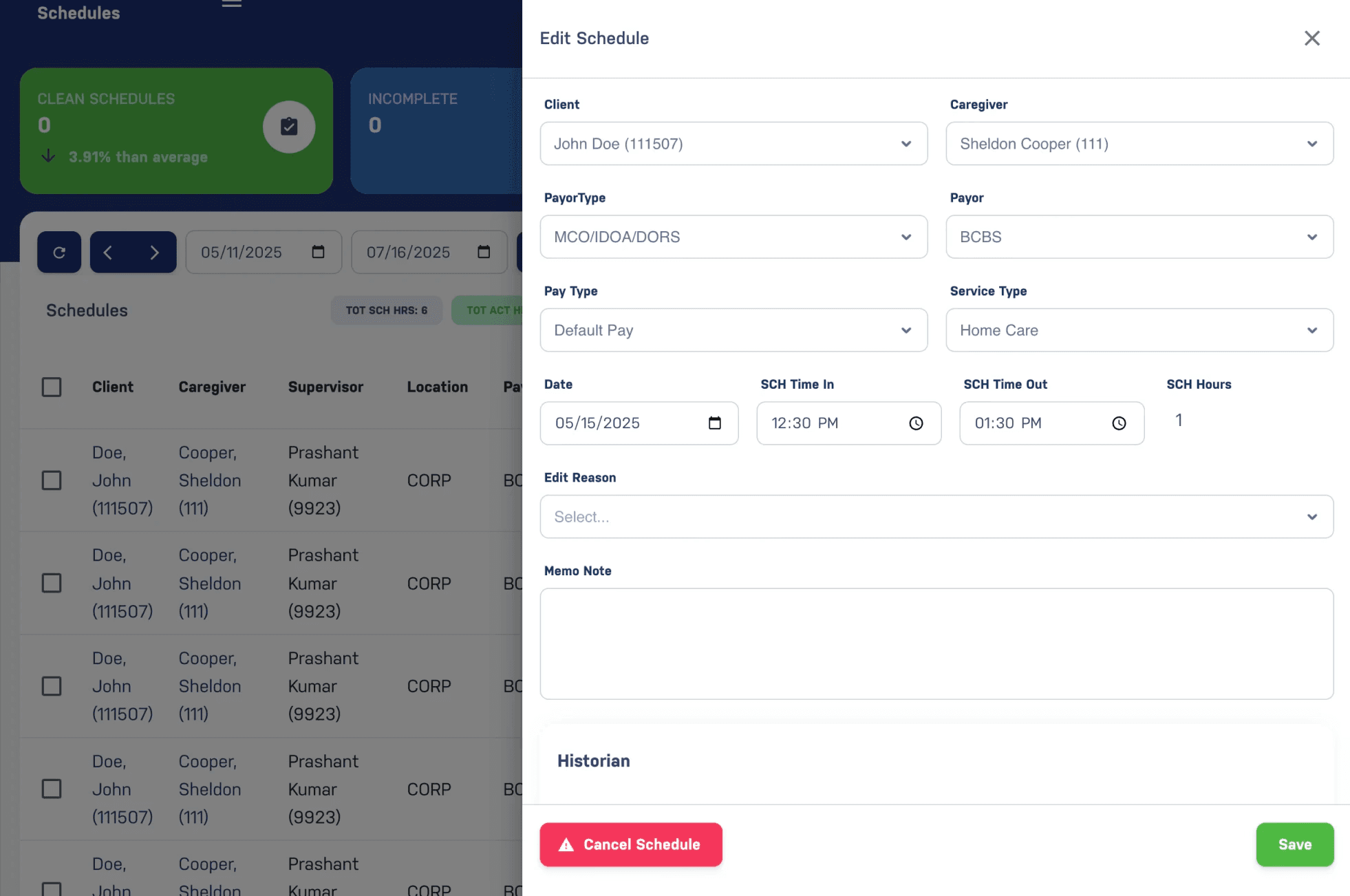
Future schedule updates use the same redesigned interface while retaining the scheduling functionality your team already uses.
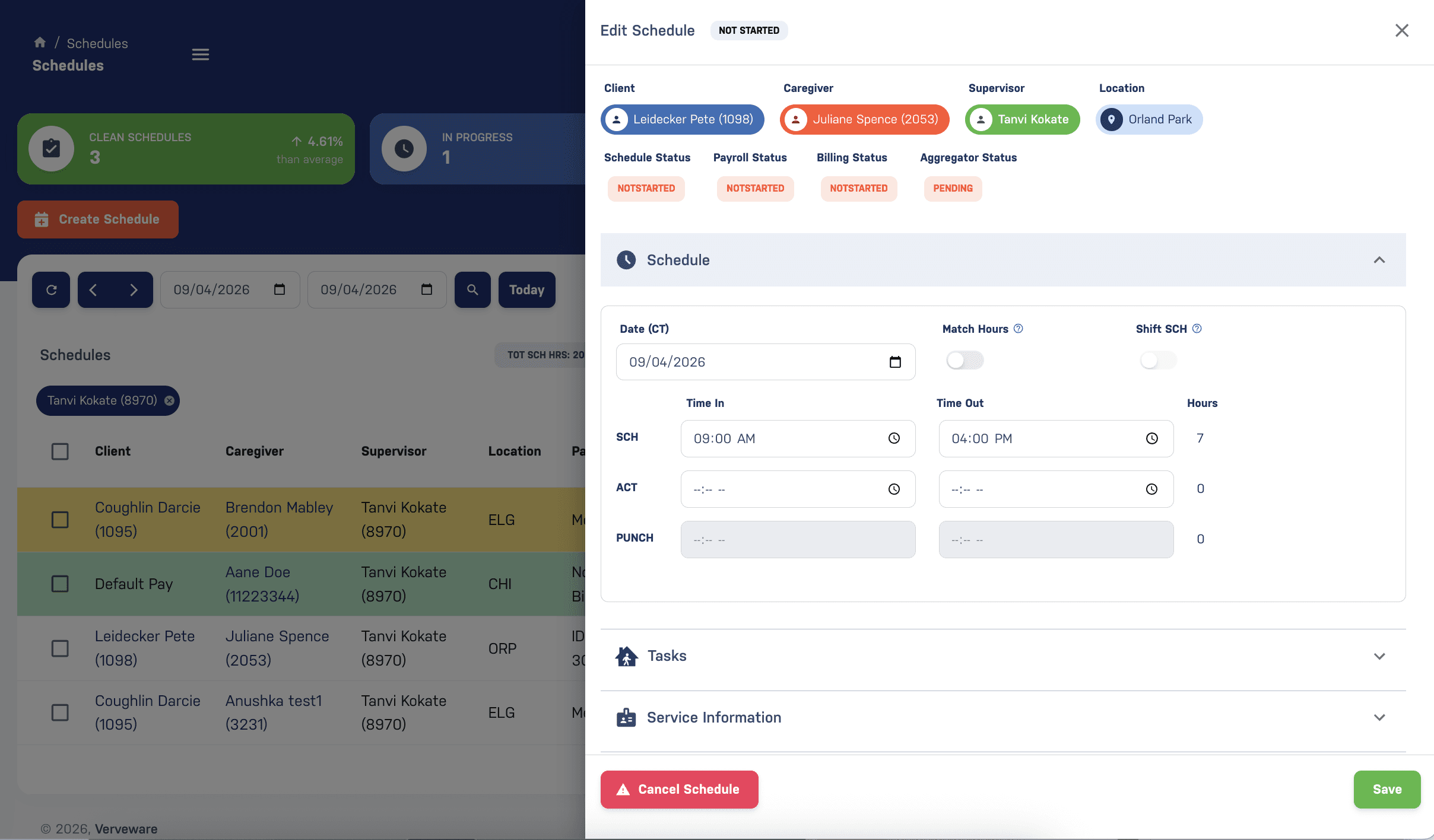
The goal is to make schedule management easier to navigate without requiring administrators to relearn how scheduling works in Verveware.
Clearer Tasks, Exceptions, and Time Entries
The update includes several smaller improvements alongside the new scheduling interface.
Task selection and management are more intuitive, making it easier to work with the tasks associated with a schedule. Schedule exceptions are also more visible so administrators can identify relevant exceptions while managing schedules.
Time entry has been improved as well, with clearer differentiation between scheduled time, actual time, and punch time. Keeping these different time values visually distinct helps administrators understand what they are reviewing when working with visit and schedule information.
Together, these changes give homecare scheduling teams a cleaner view of the information they already use without changing the fundamental scheduling workflow.
Start Using the Updated Scheduling Experience
No action is required from your agency. The new scheduling interface is already available in Verveware when you create or edit schedules.
Continue managing schedules as you normally would, and use the new Multi Day toggle whenever you need to create a schedule across multiple days.
Want to see the updated homecare scheduling software in action? Schedule a Verveware demo to walk through the new scheduling experience.


