Know Exactly Which Visits Reached the State Aggregator

Know Exactly Which Visits Reached the State Aggregator

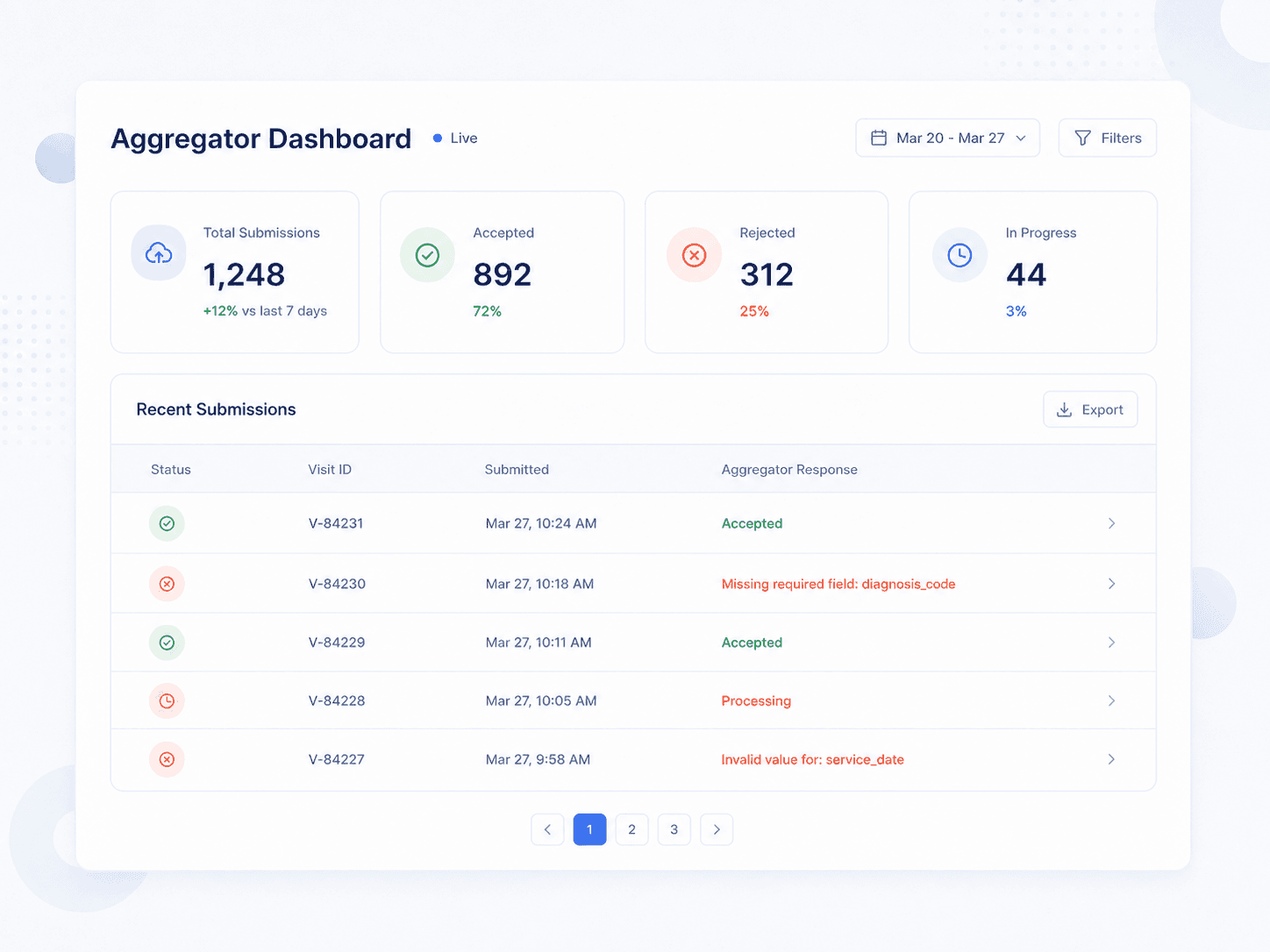
A visit can be perfectly compliant in your system and still fail at the state aggregator. Those are two different things, and most agencies cannot see the second one at all. The Aggregator Dashboard shows every submission, its status, and the exact reason the aggregator gave for rejecting it.

A visit can be perfectly compliant in your system and still fail at the state aggregator. Those are two different things, and most agencies cannot see the second one at all. The Aggregator Dashboard shows every submission, its status, and the exact reason the aggregator gave for rejecting it.

the problem

Aggregator Failures Are Invisible Until They Are Expensive

Compliance in your EVV system and acceptance at the state aggregator are separate tests. Agencies routinely pass the first and fail the second without knowing it.

Compliant but Rejected

A visit satisfies every EVV rule you can see and still fails at the aggregator because a client identifier was blank or a payer type was mapped wrong.

Compliant but Rejected

A visit satisfies every EVV rule you can see and still fails at the aggregator because a client identifier was blank or a payer type was mapped wrong.

Compliant but Rejected

A visit satisfies every EVV rule you can see and still fails at the aggregator because a client identifier was blank or a payer type was mapped wrong.

Errors With No Explanation

The aggregator returns a rejection and it lands nowhere. Nobody knows whether to fix the caregiver, the client, the schedule, or the payer setup.

Errors With No Explanation

The aggregator returns a rejection and it lands nowhere. Nobody knows whether to fix the caregiver, the client, the schedule, or the payer setup.

Errors With No Explanation

The aggregator returns a rejection and it lands nowhere. Nobody knows whether to fix the caregiver, the client, the schedule, or the payer setup.

Compliance Rates You Discover Late

Your EVV compliance percentage per payer is a number the state already has. Most agencies see it for the first time when someone else raises it.

Compliance Rates You Discover Late

Your EVV compliance percentage per payer is a number the state already has. Most agencies see it for the first time when someone else raises it.

Compliance Rates You Discover Late

Your EVV compliance percentage per payer is a number the state already has. Most agencies see it for the first time when someone else raises it.

features

Every Submission, With Its Reason
Status on Every Visit

PENDING means queued. SENT means transmitted and awaiting confirmation. COMPLETED means accepted. FAILED means rejected. The badge appears on the schedule record itself, not just in the dashboard.

The Aggregator's Own Words

For every failed schedule, Verveware displays the exact reason text the aggregator returned. That wording comes from the aggregator, not from an interpretation layer, so you are troubleshooting the actual problem.

The Aggregator's Own Words

For every failed schedule, Verveware displays the exact reason text the aggregator returned. That wording comes from the aggregator, not from an interpretation layer, so you are troubleshooting the actual problem.

Caregiver Errors, Called Out Separately

A visit can fail because of caregiver data rather than visit data. The Caregiver Error column identifies missing or invalid caregiver fields, because if the caregiver fails, the visit fails automatically.

Copy for Ticket

One click copies the transaction ID, payload, and failure reason. That is exactly what aggregator support asks for, and it turns a support ticket from a half hour into a paste.

HOW IT WORKS

Working a Failed Submission

01

Start on the Failed tab

Filter straight to failures, or click the Failed summary card to narrow the table instantly.

01

Start on the Failed tab

Filter straight to failures, or click the Failed summary card to narrow the table instantly.

02

Read the reason

Hover the Reason column for the full error. Check the Caregiver Error column too, since caregiver data problems fail the visit on their own.

02

Read the reason

Hover the Reason column for the full error. Check the Caregiver Error column too, since caregiver data problems fail the visit on their own.

03

Open the schedule

Click the row to open the schedule record and fix the underlying problem: a missing identifier, a zero-duration visit, an eligibility date mismatch.

03

Open the schedule

Click the row to open the schedule record and fix the underlying problem: a missing identifier, a zero-duration visit, an eligibility date mismatch.

04

Retry the single row

Per-row Retry resends that one schedule. It only works on FAILED rows, so you are never resending something that already succeeded.

04

Retry the single row

Per-row Retry resends that one schedule. It only works on FAILED rows, so you are never resending something that already succeeded.

05

Or resend in bulk

After a bulk data fix, use Resend in the top toolbar to push all failed completed schedules at once. This is rate-limited to once every sixty minutes.

05

Or resend in bulk

After a bulk data fix, use Resend in the top toolbar to push all failed completed schedules at once. This is rate-limited to once every sixty minutes.

06

Escalate what will not clear

If a schedule keeps failing after your data is correct, use Copy for Ticket and open a support ticket with the aggregator directly.

06

Escalate what will not clear

If a schedule keeps failing after your data is correct, use Copy for Ticket and open a support ticket with the aggregator directly.